
• Link to Facebook
  • Link to X
  • Home
  • Contact
  • Log In
206-588-185816700 19th Ave SW, Burien WA
Gregory Seahurst Swim Club
  • About
    • About the Club
    • Board of Directors
    • Bylaws
    • Rules & Regulations
    • 2026 Pool Parties – Membership Required
    • Group Lessons
    • Pool & Court Use
    • Guest Policy
    • 2026 Pool Schedule
  • Membership
    • 2026 GSSC Budget Approval
    • Membership Information
    • Current Waitlist & FAQ
    • Join Our Waitlist
    • Manage Account
    • Payments
  • Teams
    • Swim Team
    • Dive Team
    • Tennis Team
    • Water Polo Team
    • Directions to Meets
    • Volunteers
    • Teams Registration
  • News
  • Calendar
  • Employment 2026
  • Log In
  • Menu Menu

Step-by-Step Guide to Paying Your Dues and Account Balance

We know learning all the functions of our new website can be a little daunting and frustrating, so we created this step-by-step guide to help you navigate through making your annual dues and account balance payments. We hope this guide helps!

STEP 1:  Go to gregoryseahurst.com

STEP 2:  Log in to your account using your email and password

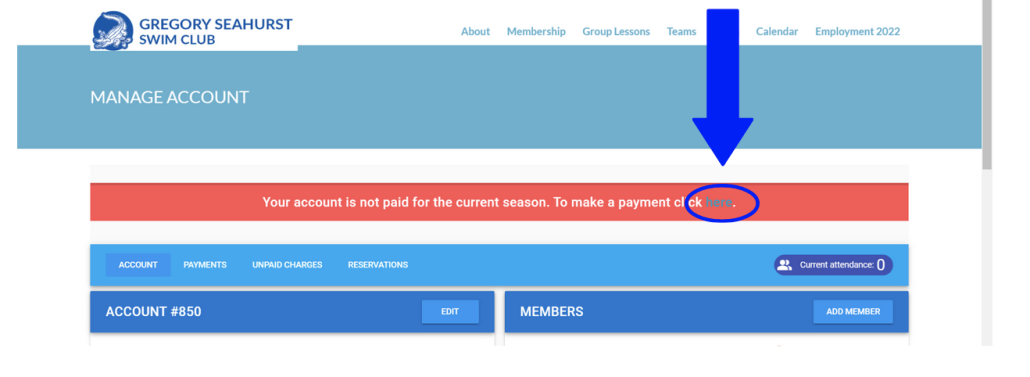
STEP 3: If you have unpaid MEMBERSHIP DUES, you will have a RED BAR across the top of your page when you log in.  You can either click the Pay Here link
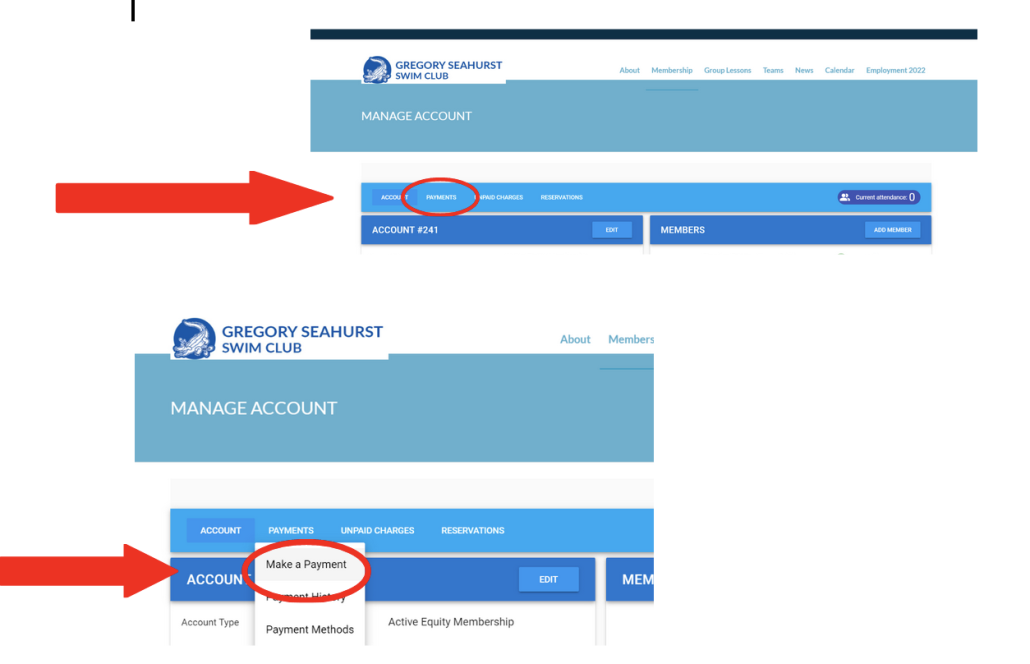
OR go to the Payments Tab and click Make A Payment on the Selection Bar:
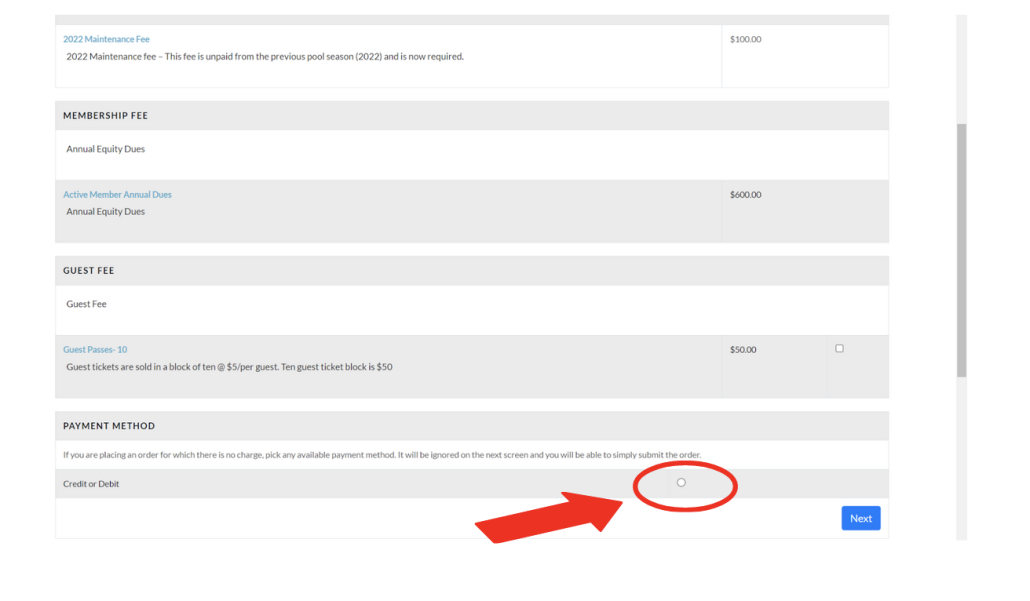
STEP 5: You will then see your pending charges – Annual Membership Dues, Maintenance Fees and some optional charges, like guest passes, etc.  For the optional fees, there will be a check box option to select that charge.  For the non-optional fees like Annual Membership Dues and past years Maintenance Fees, there will be no check box because these are REQUIRED fees.

If you want to pay the current year’s Maintenance Fee at this time, you would select the current year Maintenance Fee box (For example: 2023 Maintenance Fee).  Paying your current year’s Maintenance Fee upfront is recommended if you are not planning on participating in any volunteer work parties at this pool this season.

Once you’ve reviewed the optional fee boxes and required fees, select the Credit or Debit check box and click NEXT.
STEP 6: Enter in your payment information and click submit.

Search Search

Events

October 2026
SMTWTFS
     1 2 3
4 5 6 7 8 9 10
11 12 13 14 15 16 17
18 19 20 21 22 23 24
25 26 27 28 29 30 31
« Sep   Nov »

Recent News

  • Step-by-Step Guide to Paying Your Dues and Account Balance

Home

Established in 1959. Welcome to Gregory Seahurst Swim Club-home of the Gators! Contact us today!

16700 19th Ave SW, Burien WA

206-806-8331

Mailing Address:
P.O. Box 818
Seahurst, WA 98062

Quick Links

  • About the Club
  • Membership
  • Calendar
  • News
  • Contact
  • Log In

Location

© Copyright - Gregory Seahurst Swim Club | Powered by Member Splash
  • Link to Facebook
  • Link to X
Scroll to top Scroll to top Scroll to top